It has never been a better time to buy a 4K gaming monitor since they continually keep falling in price. More 4k content is becoming available, and consoles will support 4k gaming soon. That’s why we are going to look at five of the best cheap 4k monitors that you can get on a budget.
1. Dell P2415Q, a 24-inch IPS 4k panel

Now, as you can see, from its external appearance, it looks great. It has a nice thin bezel, and the stand, apart from looking fantastic, has the advantage that it can rotate the monitor into portrait mode. When you switch it on, you will be stunned by the image quality. It has an AH-IPS panel, which is 8-bits per pixel, plus a bit of clever dithering, to give 10-bits or 1.07 billion colors. I
n fact, this monitor covers the entire sRGB color space, so it is excellent for photographers or designers too. And because it is an IPS panel, it excels in all other areas as well. It has wide viewing angles (up to 178 degrees), and a static contrast ratio of 1155:1.
Now regarding ports, this monitor has HDMI 1.4, DisplayPort 1.2 and Mini DisplayPort 1.2. And honestly, for something which looks this good on the outside and has such a good panel quality, it is incredible that it is that cheap. A bit of a bargain, I think.
2. Samsung U28E590D
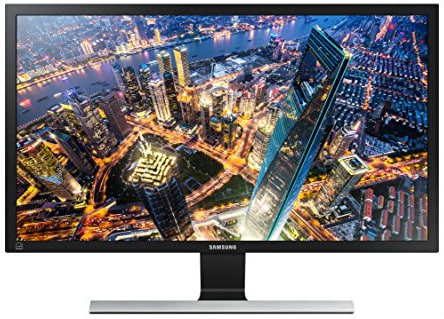
It has a fantastic stand, very minimalistic, and thin bezels. The only problem is that some Amazon reviewers have commented that the monitor wobbles and nearly tips over when they move their desks. But when you play games on it, you won’t notice any wobbling or tearing, because it has AMD FreeSync built in which matches the refresh rates between your GPU and your monitor.
And Samsung has stuck with the gamer theme when it comes to choosing the panel. They have gone for a 28-inch TN, and you are probably thinking, “Oh, no, terrible viewing angles, washed out colors.” But it is not at all bad. That is part of the new generation of TN panels.
And Samsung has managed to integrate 170-degree viewing angles, unheard of for TN panels, while keeping their main advantage, which is fast response times – this particular monitor has 1 millisecond. And the good news just keeps going! It has HDMI 2.0 ports. That means that you can get 60Hz at 4K through HDMI. It also has DisplayPort 1.2, and all this stuff for a price of only less than $499. That is a cheap 4k monitor for gaming.
3. Asus PB287Q
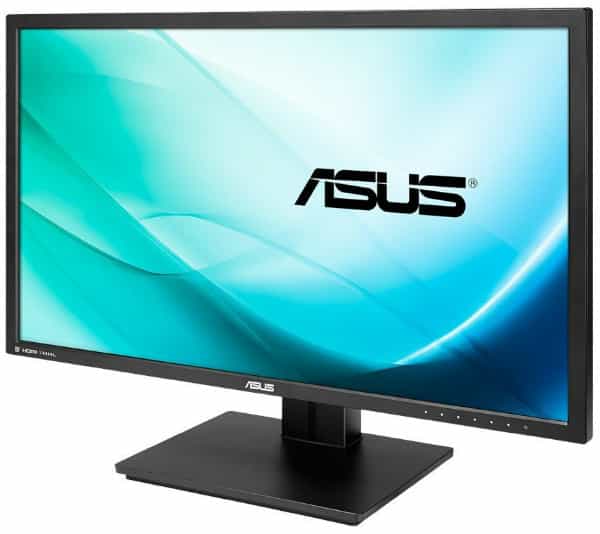
Now in comparison to the previous two monitors, this one looks just a little bit dull on the outside. Very business-like, but that’s not necessarily a bad thing. But it does have a TN panel, which some people might see as a bit of a negative. But here is the incredible thing. It is a 28-inch 10-bit TN.
I bet you have never heard of one of those before. So that is 1.07 billion colors with no dithering at all. Now you might be thinking, “Well, 10-bits on a budget, there is got to be some compromise here.” But there is none. It has a 1-millisecond gray to gray response time, which is up there with the best of them. Despite the TN, it has a horizontal viewing angle of 170 degrees. And the contrast ratio – you wouldn’t believe this – it is 100,000,000:1.
Do you want to know the reason? Because it is a dynamic contrast ratio, which means that the backlight brightness changes depending on the content that you are viewing. Now, regarding ports, you are getting two HDMI 1.4, so, unfortunately, that means that you get only 30Hz with 4K content. But you also get a single DisplayPort 1.2, which allows you to have the full 60Hz. Overall, this monitor, which is only around $500 on Amazon, sounds like an excellent deal to me.
4. BenQ BL3201PH

First of all the construction looks very robust. The stand almost looks like metal, but it is just plastic. And unlike some other monitors, you can see that the base is really large, to prevent the risk of it tipping over. And to go with the large base is a colossal screen – it is 32 inches. It has a semi-glossy covering. And the panel is very interesting, it is called AHVA, and it is a compromise between TN and IPS.
So that means that you are getting TN-style refresh rates – on this monitor, it is 4ms gray to gray – while still maintaining those IPS viewing angles of 160 or 170 degrees. Now this fancy panel also has some other good advantages. It has no perceptible backlight bleed at all, which is quite impressive.
It also has 8-bits plus a bit of dithering to give an effective 10-bits and 1.07 billion colors. And it covers the entire sRGB color space. Plus, the contrast ratio of 1000:1 is quite reasonable. Now, regarding ports, you are getting dual HDMI 1.4, DisplayPort 1.2, Mini DisplayPort 1.2 and dual-link DVI, which is quite unusual. This monitor might be a bit larger and a bit more expensive than the other options on this list, but still, it only costs around $800 from Amazon, and I reckon that paying the premium is worth it.
5. 4k Monitor LG 27MU67-B

The LG 27MU67-B is the cheapest 4k monitor worth owning. This is a 27-inch 4k IPS monitor for less than $530. It promises some nice images, and it turns out that it does deliver. The 99% sRGB coverage is excellent, so it is ideal for colour-accurate work. And the static contrast ratio of 1000:1 isn’t too bad either. It is the same old 8-bit panel with dithering to create 10-bit with 1.07 billion colors that we have seen again and again on this list, but it does work very well.
But here is something that you haven’t seen on this list. An IPS with AMD FreeSync included. But you are probably saying, “Well, why to bother including that technology on an IPS when the response time isn’t fast enough to notice it?” Well, it turns out that this particular panel has 5 milliseconds gray to gray.
. Do be warned though that it might be very hard for your graphics card to push all those pixels around. Talking about pushing things around, who was pushing the design team at LG to make such terrible decisions with the ports on this monitor? Sure, it has DisplayPort 1.2, Mini DisplayPort 1.2, and two HDMI 1.4 ports. But, come on, they are no USB ports included at all, which could be a massive downside for some users.
Then again, I suppose there is not much point in getting too disappointed because you are getting a full 27-inch, IPS, 4K gaming monitor for less than $500.
*Results contained within may not be an implication of future results. Always consult your physician before making any dietary changes or starting any nutrition, health control or exercise program.

No comments:
Post a Comment